

Meta Platforms has announced that reservations are open for people to select their WhatsApp usernames—a feature that will be rolling out later this year.
Here’s what you need to know about WhatsApp usernames and how to reserve yours today.
What is a WhatsApp username?
A WhatsApp username is the biggest change to how you connect and message with others on WhatsApp since the messenger debuted 17 years ago.
Since its launch, WhatsApp has facilitated communications based on users’ phone numbers. In order to text someone on WhatsApp, you needed their registered phone number.
But phone numbers are sensitive things. We use them everywhere—and not just for calls and texting. Phone numbers can serve as identifiers, be how we receive two-factor authentication codes, and even reveal which parts of the country we live in.
Yet if you’ve wanted to communicate with an individual or business on WhatsApp, you’ve had to provide this sensitive information. Until now, that is.
Starting later this year, WhatsApp will allow you to swap messages with someone based on a new username system the service is rolling out. Meta, which also owns Facebook, Instagram, and Threads, opened reservations for WhatsApp usernames on Monday.
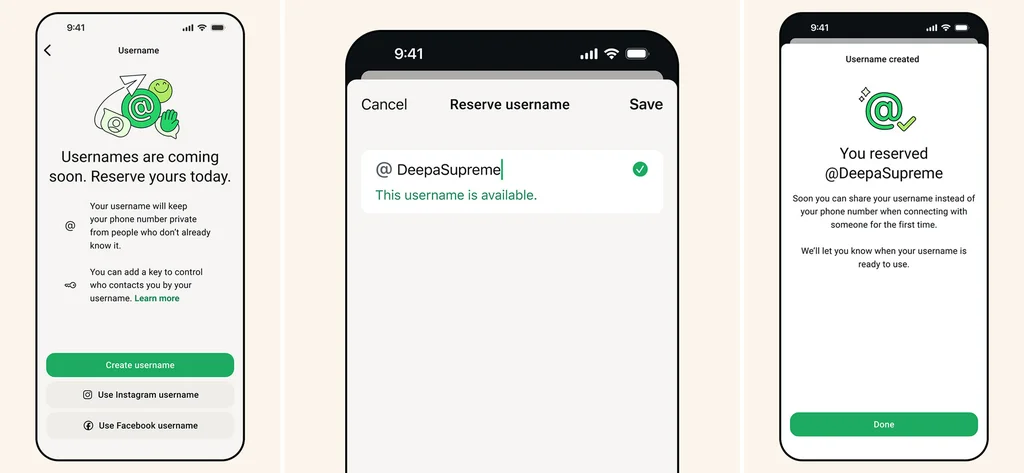
That means you no longer need to hand over your phone number to a stranger to communicate with them on WhatsApp—if you don’t want to. You can simply give them your unique WhatsApp username instead.
Doing so will protect your phone number from people and businesses, while still ensuring you can communicate with them via WhatsApp as effortlessly as you always could.
Can I start using a WhatsApp username today?
No. WhatsApp hasn’t enabled the username feature yet. It’s still coming later this year.
WhatsApp has opened reservations so you can select your desired username now, and once you do, no one else will be able to take that name.
Then, when the username feature goes live later this year, you’ll be able to start sending and receiving messages at your new WhatsApp username on Day One.
How will WhatsApp usernames work?
Once the feature launches, you’ll be able to give someone your WhatsApp username instead of your phone number. Sending and receiving messages between usernames will work as sending and receiving messages between phone numbers do now.
WhatsApp also says there will be “no directory to browse and no suggestions – people will need to know your exact username to contact you for the first time,” which will help protect you from unsolicited WhatsApp messages.
How can I reserve my WhatsApp username?
WhatsApp has already begun rolling out the username reservation system in some parts of the world. When you can take part, you’ll see a notification inside WhatsApp.
Here’s how you can reserve your WhatsApp username once the reservation system goes live for you:
- Open WhatsApp.
- Tap on the profile (“You) icon.
- Tap Account.
- Tap Username.
- Tap Create Username.
- Type your desired username in the @Username field.
- Tap Save.
As for choosing a username, WhatsApp suggests you should choose “something unique that only people you want to contact you will know.”
Usernames can be between 3 and 35 characters, and they do not have to be the same username you use on Facebook or Instagram.
While it may be tempting to try to reserve your full name as your username, for ultimate privacy, you probably shouldn’t choose your full legal name, since anyone who knows it could then simply guess your WhatsApp username.
