
Close Menu
    What's Hot

    Last time each Canadian team won the Stanley Cup: Drought extends to 33 years in Canada

    You can buy two of Anker’s Qi2 wireless chargers for under $25

    The defense-tech founder betting on autonomous war

    Facebook X (Twitter) Instagram
    Trending
    • Last time each Canadian team won the Stanley Cup: Drought extends to 33 years in Canada
    • You can buy two of Anker’s Qi2 wireless chargers for under $25
    • The defense-tech founder betting on autonomous war
    • White House Releases Results of Trump’s Latest Physical Exam
    • Who’s the Vegas Retiree With the Big Offer for Greenland?
    • Lithuania, Once Occupied by Germany, Is Glad German Troops Are Back
    • How Curry Shops Got Caught in Japan’s Immigration Crackdown
    • The Missing Factor Behind Why Your Marketing Isn’t Converting
    interluknewsinterluknews
    • Home
    • Business
      • Corporate News
      • Industry Insights
      • Startups & Entrepreneurship
      • Technology & Innovation
    • Economy
      • Economic Policy
      • Financial Analysis
      • Inflation & Interest Rates
      • Trade & Markets
    • Global
      • Conflicts & Security
      • Diplomacy
      • Global Trends
      • International Affairs
    • Lifestyle
      • Fashion
      • Food & Dining
      • Personal Development
      • Travel
    • Opinion
      • Columns
      • Editorials
      • Expert Opinions
      • Reader Voices
    • More
      • Politics
        • Elections
        • Government & Policy
        • International Relations
        • Political Analysis
      • Sports
        • Cricket
        • Football / Soccer
        • International Sports
        • Local Sports
      • Technology
        • Artificial Intelligence
        • Cybersecurity
        • Gadgets & Reviews
        • Tech News
      • South Africa News
    Facebook X (Twitter) Instagram
    interluknewsinterluknews
    Personal Development

    Google Chrome just dropped 3 new time-saving features

    adminBy adminMarch 2, 2026No Comments3 Mins Read
    Share Facebook Twitter Pinterest Copy Link Telegram LinkedIn Tumblr Email
    Google Chrome just dropped 3 new time-saving features
    Share
    Facebook Twitter LinkedIn Pinterest Email

    Let’s be honest: The web browser is the modern-day operating system for everything from managing spreadsheets to pretending to work while reading tech blogs.

    Google knows this. That’s why the Chrome team announced a trio of new productivity features designed for people who basically live inside their browsers. Best of all? They’re actually quite useful.

    Here’s what you need to know to get your tab-hoarding, PDF-losing life back in order.

    Split View

    You know the drill. You’re trying to reference a document while writing an email, or maybe you’re watching a tutorial while trying to write code. You end up clicking back and forth between two tabs until your eyes cross.

    Enter Split View. It does exactly what it says on the tin: It lets you view two tabs side-by-side in a single window. No more dragging and resizing windows manually like it’s 2004.
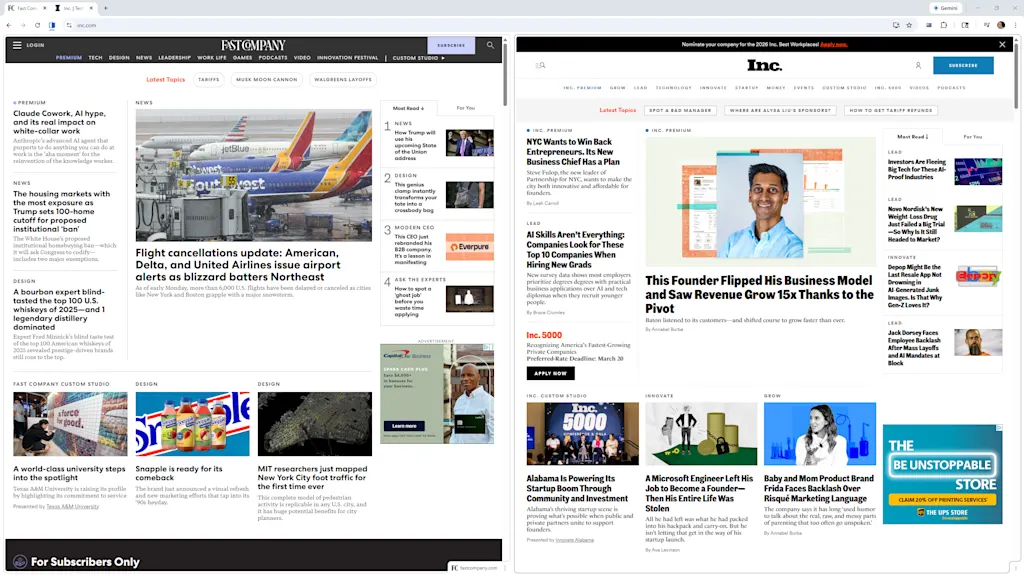
    Google Chrome just dropped 3 new time-saving features

    The feature is built into Chrome now, creating a single, organized workspace that keeps you focused.

    Unfortunately, it’s not super obvious. To enable it, you’ll need to open a new tab, then right-click said tab, and select “Add tab to new split view.”

    You’ll then have to select which of your open tabs to add to the other split-view pane. It takes about three or four more clicks than it should, but there you have it.

    PDF Annotations

    File this one under “Finally!”

    The Chrome PDF Viewer has always been a handy way to look at documents, but looking was about all you could do. If you needed to highlight a line or add a quick note, you had to download the file, open a dedicated PDF application, make the change, save it, and probably upload it again.

    Exhausting.
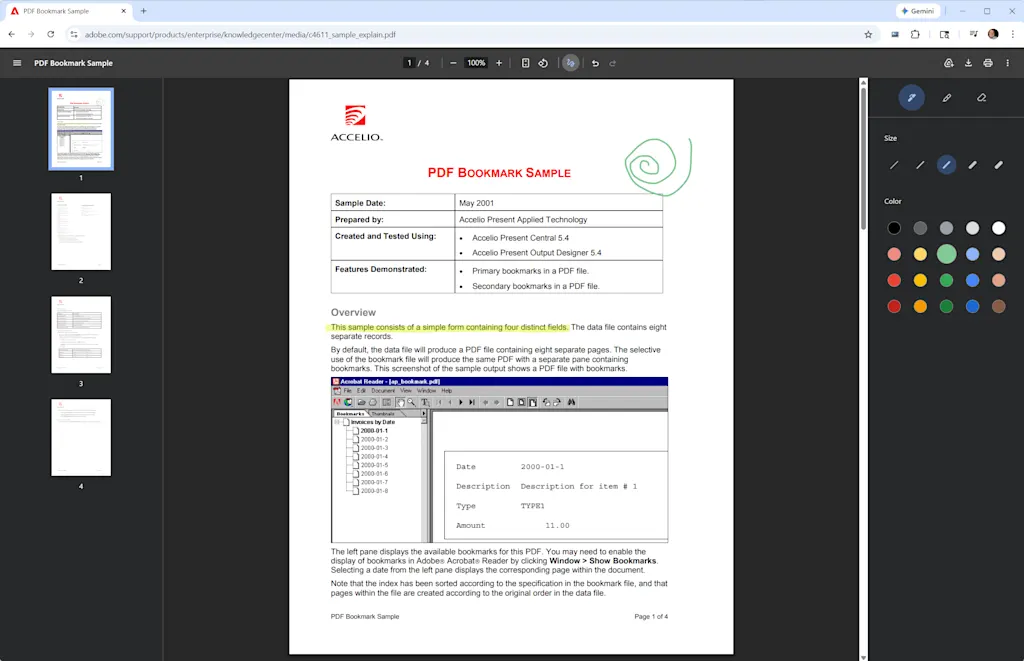
    Now you can highlight text and add handwritten notes to PDFs directly inside the browser by clicking the little squiggle icon at the top of any open PDF.

    This stuff isn’t as robust as Microsoft Edge’s PDF features, which let you enter typed text into form fields as well. But it’s still a tiny friction remover that’s going to save an unreasonable amount of annoyance.

    Save to Drive

    If your Downloads folder looks like a digital landfill of files named “Invoice_Final_V4(1).pdf,” you’re not alone. You download an important file, completely lose track of where your computer put it, and spend 10 minutes searching your hard drive.
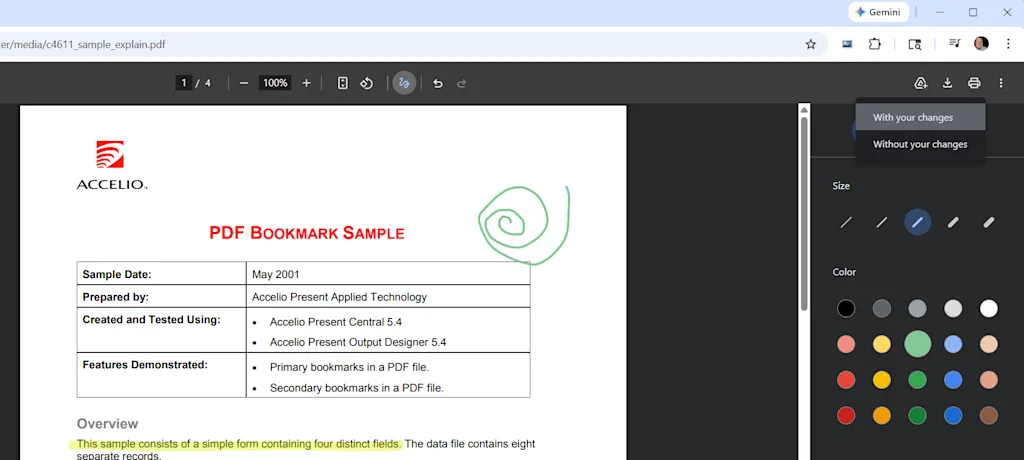
    To fix this, Chrome has added a direct “Save to Google Drive” feature. When you’re looking at a PDF, you can bypass the local download entirely by clicking the Google Drive icon in the upper-right corner.

    Chrome will whisk the file away to a dedicated “Saved from Chrome” folder right in your Google Drive. It’s instantly backed up, organized, easily searchable, and available on whatever device you decide to pick up next.


    Chrome dropped features Google timesaving
    Follow on Google News Follow on Flipboard
    Share. Facebook Twitter Pinterest LinkedIn Tumblr Email Copy Link
    Previous ArticleA tale of two variants – The Mail & Guardian
    Next Article Shopping in Paris: Exploring the City’s Historic Covered…
    admin
    • Website

    Related Posts

    The defense-tech founder betting on autonomous war

    May 30, 2026

    China’s Rise in Drug Development Looms Over U.S.

    May 30, 2026

    Design for the ADHD brain

    May 30, 2026
    Leave A Reply Cancel Reply

    Demo
    Latest Posts

    Last time each Canadian team won the Stanley Cup: Drought extends to 33 years in Canada

    You can buy two of Anker’s Qi2 wireless chargers for under $25

    The defense-tech founder betting on autonomous war

    White House Releases Results of Trump’s Latest Physical Exam

    Latest Posts

    Subscribe to News

    Get the latest sports news from NewsSite about world, sports and politics.

    Advertisement
    Demo

    We are a digital news platform delivering timely, accurate, and insightful coverage of politics, global affairs, business, economy, sports, and more. Our mission is to keep readers informed with reliable news, clear analysis, and stories that truly matter.
    We're social. Connect with us:

    Facebook X (Twitter) Instagram Pinterest YouTube

    Subscribe to Updates

    Get the latest creative news from FooBar about art, design and business.

    Type above and press Enter to search. Press Esc to cancel.

    Powered by
    ...
    ►
    Necessary cookies enable essential site features like secure log-ins and consent preference adjustments. They do not store personal data.
    None
    ►
    Functional cookies support features like content sharing on social media, collecting feedback, and enabling third-party tools.
    None
    ►
    Analytical cookies track visitor interactions, providing insights on metrics like visitor count, bounce rate, and traffic sources.
    None
    ►
    Advertisement cookies deliver personalized ads based on your previous visits and analyze the effectiveness of ad campaigns.
    None
    ►
    Unclassified cookies are cookies that we are in the process of classifying, together with the providers of individual cookies.
    None
    Powered by